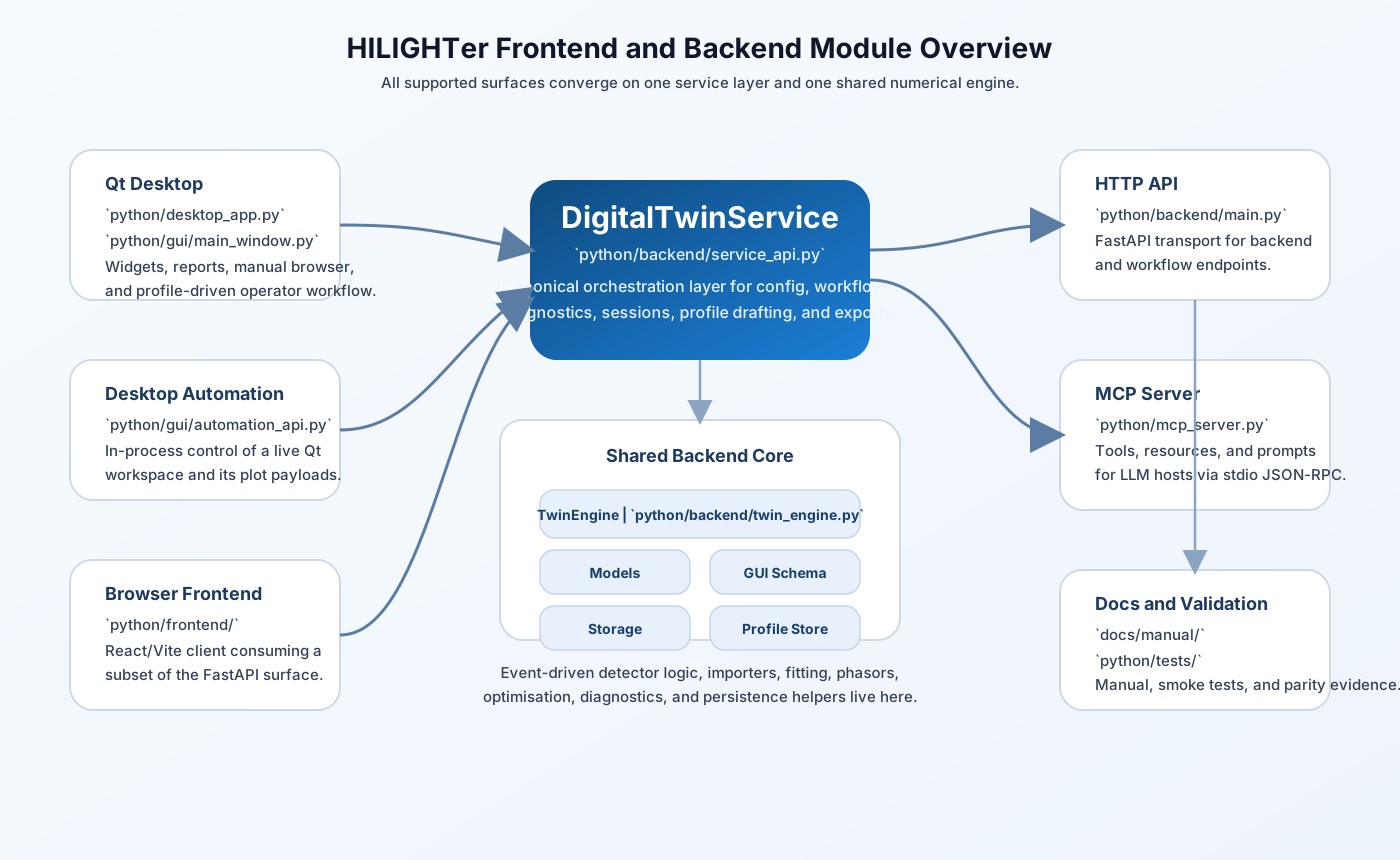
HILIGHTer is a Python-first FLIM engineering workspace. The main product is a Qt desktop application backed by a shared numerical engine, with additional HTTP, Python, desktop-automation, MCP (Model Context Protocol), and browser-frontend surfaces.
For the smoothest desktop install:
pipThe desktop app also needs Qt/WebEngine dependencies, which are installed from python/desktop_requirements.txt.
The desktop launcher installs missing desktop dependencies into the active Python environment on first run. Using a dedicated virtual environment is strongly recommended.
python -m venv .venv
.venv\Scripts\activate
python -m pip install --upgrade pip
run_desktop.bat
If you prefer to preinstall desktop dependencies instead of letting the launcher do it:
python -m pip install -r python\desktop_requirements.txt
run_desktop.bat
What happens on first launch:
python/desktop_app.pypython/desktop_requirements.txtIf the first launch needs to install packages, it can take a while.
Use this when you only need the main Qt application.
python -m venv .venv
.venv\Scripts\activate
python -m pip install --upgrade pip
python -m pip install -r python\desktop_requirements.txt
run_desktop.bat
Use this when you want the FastAPI backend, scripts, or test toolchain without the full desktop stack.
python -m venv .venv
.venv\Scripts\activate
python -m pip install --upgrade pip
python -m pip install -r python\requirements.txt
Use this when you want the desktop app, backend/API tooling, and the browser frontend.
python -m venv .venv
.venv\Scripts\activate
python -m pip install --upgrade pip
python -m pip install -r python\desktop_requirements.txt
python -m pip install -r python\requirements.txt
cd python\frontend
npm install
cd ..\..
run_desktop.bat
Primary launcher:
run_desktop.bat
Direct launcher:
cd python
python desktop_app.py
The desktop manual is available from inside the app with Ctrl+H.
From the repository root:
python -m uvicorn python.backend.main:app --reload
Useful endpoints:
http://127.0.0.1:8000/http://127.0.0.1:8000/openapi.jsonhttp://127.0.0.1:8000/api/v1/backend/statusIf you want the browser frontend as well:
cd python\frontend
npm run dev
The current frontend targets http://localhost:8000 and still uses a small set of compatibility routes in addition to the /api/v1/... endpoints.
The MCP server lives at:
python/mcp_server.pyIt is a stdio server intended to be launched by an MCP host, not by opening it in a browser.
Smoke test:
python python\tools\mcp_smoke_test.py
python/
python/backend/
python/gui/
python/frontend/
python/profiles/instruments/
python/tests/
python/tools/
python/tools/dev/
docs/
resources/
The repository no longer includes active MATLAB application code. The maintained runtime lives under python/.
Syntax check:
python -m py_compile python\desktop_app.py python\gui\main_window.py python\backend\*.py
Run tests:
pytest python/tests
Run only the event-driven backend tests:
pytest python/tests/test_event_driven.py
MCP smoke test:
python python\tools\mcp_smoke_test.py
Make sure the desktop environment matches the pinned requirements:
numpy<2matplotlib<3.9The current requirements files already pin those versions.
The single source of truth for the project version is:
python/metadata.pyPolicy:
x.y.z is the product version.x changes only when explicitly directed by the project lead.y changes when a milestone is reached.z is derived from the git build count relative to the current milestone baseline.build is the total git commit count for the repository.run_desktop.bat keeps installing packagesThat usually means the current Python environment is missing one or more required desktop modules. Creating a dedicated virtual environment usually fixes this.
uvicorn or FastAPI imports failInstall the backend requirements into the same environment:
python -m pip install -r python\requirements.txt
Make sure both services are running from the repository root:
python -m uvicorn python.backend.main:app --reload
cd python\frontend
npm run dev
The frontend currently expects the backend at http://localhost:8000.
Possible causes:
The event-driven core is slower than the ideal Poisson core. Use modest image sizes and repeat counts when testing event-driven detector effects.
Main operator manual:
Architecture notes:
Module overview:
Optimisation notes:
This package originated as a MATLAB-to-Python port, but the active workspace is now fully Python-based. Some parity tests, replication reports, and compatibility shims still reference the earlier MATLAB baseline because they are validation artifacts rather than runtime dependencies.
We have used CODEX extensively for porting, improving the GUI, and adding many features. The users are expected to verify the results also with known cases and eventually measurements. However, here are the steps we implement for quality assurance:
The Fisher Information analysis is based on two independent techniques.
1) Numerical estimation of derivatives. The instrument samples the probability density function, and the derivatives of the resulting histograms are evaluated numerically. These numerical estimations are fast and used to evaluate Fisher Information. 2) To ensure the numerical estimations are accurate, and also to introduce a secondary way to verify that agents did not introduce artefacts into the numerical estimations of FI, HILIGHTer verifies results with independent Monte Carlo simulations.
Agent-based verification. When we introduce new features, agents are asked to run independent diagnostic tests
Human-in-the-loop. All modules are periodically audited to ensure the Digital Twin remains grounded in the correct physics and maths.
Current status of auditing. We are proceeding with a new auditing cycle on the active beta line. The beta version is already publicly shared, and the remaining manual audit work is intended to strengthen scientific confidence before a later stable release.